
Vulnerability Management From Inventory Evidence
Use the versions already in your inventory
OTserver compares recorded vendor, product, and version data with a local vulnerability catalog. A new match requires both a vendor/product match and a reported version that satisfies an affected NVD or CSAF exact version or range. Missing version evidence cannot create a match.
New results are unconfirmed metadata matches for investigation. A user can confirm applicability after reviewing the evidence. That decision is a human review, not an active device test. An empty result does not establish that equipment is unaffected.
Catalog sources
| Source | Role in matching |
|---|---|
| NVD JSON 2.0 feeds | CVE details and affected CPE version constraints |
| CERT@VDE CSAF aggregator and CISA OT/IT CSAF feeds | Product-tree identity and affected exact versions or ranges |
| CISA Known Exploited Vulnerabilities | Known-exploitation context for catalog records |
| ICS Advisory Project | CISA ICS advisory identifiers, sectors, product distribution, and vendor headquarters |
CISA KEV and ICS Advisory Project enrichment cannot create a match count on their own because they do not supply the required affected-version constraints.
Review the evidence
Open an asset to see its highest-priority open findings, ordered by known exploitation first and then CVSS. The Security tab includes severity filters and description previews; the paginated vulnerability view lists the findings and their supporting evidence. Assembly lookups include installed modules and retain the matching component and version.
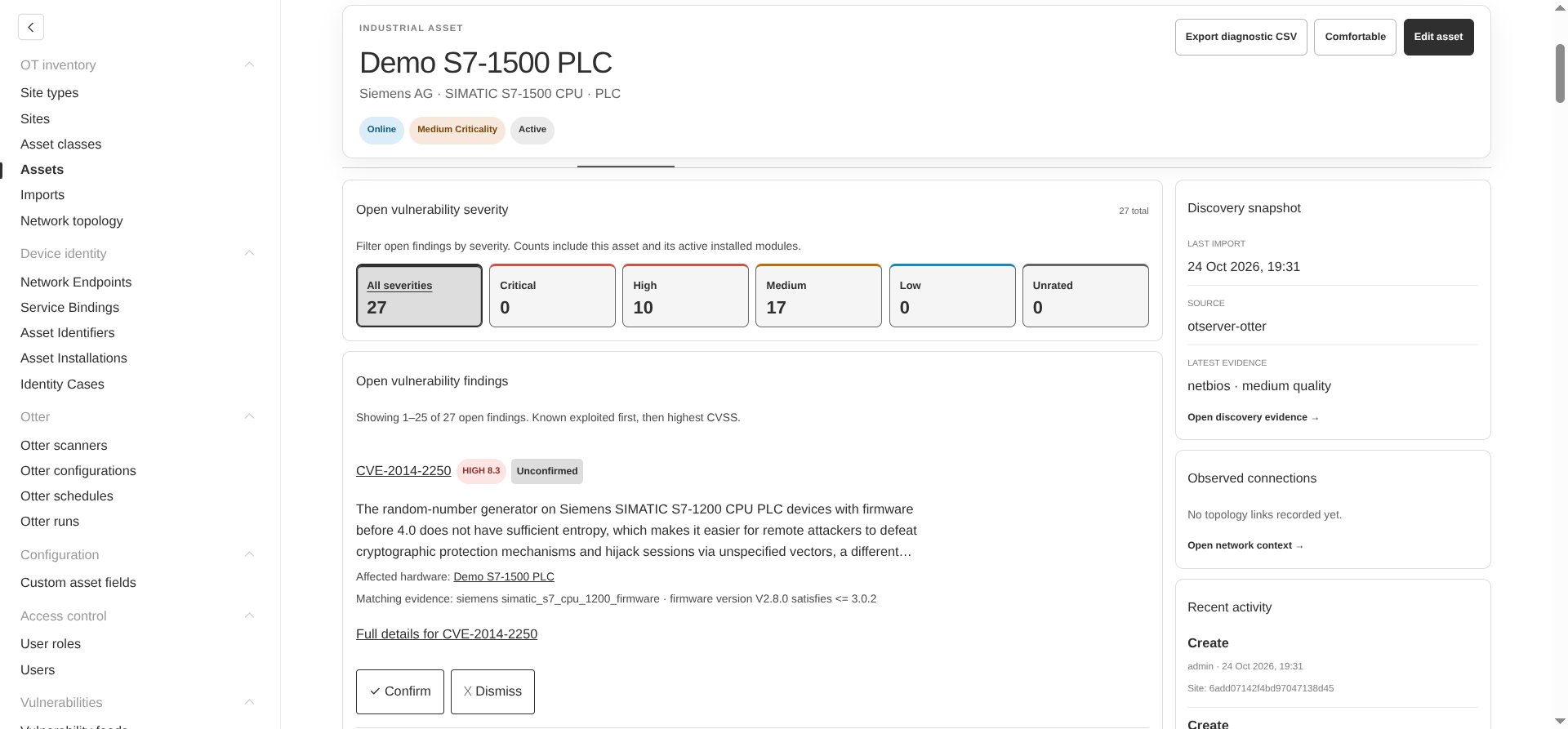
Check the recorded product and version against the advisory before deciding what action to take. Correct inaccurate asset data with a human edit; later lower-quality imports cannot overwrite it.
Review potential vulnerabilities for an asset
- Open the asset and check that its vendor, model or operating system, and reported version are recorded. Review installed modules when assessing an assembly.
- Review the asset’s vulnerability summary, then open the full vulnerability view for all potential matches.
- Start with entries marked Known exploited, then compare CVSS severity and score. Each entry includes a CVE link and a description where the catalog supplies one.
- Inspect the match reason: the matched vendor/product, the recorded version, and the affected exact version or range. Where available, the view also shows the catalog CPE and links to affected hardware components.
- Read CISA’s required action when supplied by KEV, and check associated CISA ICS advisory identifiers and sector context. Use that evidence with the equipment owner to assess applicability and plan the response.
- Confirm an applicable match or dismiss an unreviewed match that does not apply. After addressing a confirmed finding, mark it resolved.
Module matches retain their component and version, while assembly results count distinct CVEs. A CVE affecting several installed modules therefore appears with the affected hardware rather than as unrelated duplicate findings.
Keep review decisions through later imports
| Action | Result |
|---|---|
| Confirm | Records an unreviewed match as a confirmed, open finding. |
| Dismiss | Hides an unreviewed match and removes it from the open count. |
| Resolve | Closes a confirmed finding while keeping it in history. |
| Reopen | Returns a resolved finding to confirmed, open status. |
The open count includes unconfirmed matches and confirmed unresolved findings. Dismissed and resolved findings are excluded. Decisions require write access to the asset’s site and are audited.
Imports, corrected metadata, and feed updates do not erase review decisions. If a confirmed finding no longer matches the recorded product and version, OTserver flags it for human review. It remains open until someone resolves it. If evidence is missing, OTserver reports that it cannot reassess the finding.
Monitor catalog health
Administrators can open Vulnerabilities → Vulnerability Feeds to review each source’s synchronization status, last successful synchronization, stored-entry count, and reported errors. Status values distinguish idle, running, ready, partial, and failed updates. Catalog details also appear in the asset vulnerability view when the signed-in user has permission to read feed state.
Check feed health before treating a low or empty match count as meaningful. A failed refresh may leave a usable but older catalog, while an installation without a loaded catalog cannot supply current advisory coverage.
Update feeds online
The manager checks feed freshness at startup and refreshes catalogs when they are seven days old. Use Update feeds now on the Vulnerability Feeds page to request an update sooner. The maintenance queue continues the work after the browser closes.
The first NVD import downloads annual feeds from 2002 onward; completed years are retained so an interrupted import can resume. Failed downloads retain the previous usable catalog, and a failed CSAF provider refresh preserves its previous snapshot.
Import feeds in a disconnected installation
Set OTSERVER_VULNERABILITY_FEEDS=off in the web application and any external maintenance worker to disable online feed updates. Upload downloaded feeds remains available.
- Open Vulnerabilities > Vulnerability Feeds > Upload downloaded feeds, select a source, and save its download instructions.
- On an internet-connected computer, download the original publisher files and retain their filenames.
- Transfer the files through the approved boundary. Use Choose files or Choose folder on the isolated manager and retain the selection ID if you need to resume.
- Select Check uploaded files to inspect coverage, publisher dates, and links to missing files.
- Import the checked selection and review its result on the feed page.
| Source | Files to transfer |
|---|---|
| CISA KEV | known_exploited_vulnerabilities.json |
| NVD | Each selected nvdcve-2.0-YYYY.json.gz or .json, plus its matching .meta checksum file |
| ICS Advisory Project | CISA_ICS_ADV_Master.csv |
| CSAF | The CERT@VDE aggregator, all referenced provider metadata, indexes and advisories, plus both CISA OT/IT indexes and their advisories |
NVD years can be imported in batches without removing unselected years. NVD coverage remains partial until the annual feeds from 2002 onward are loaded. The .meta checksum covers the uncompressed JSON; transfer it unchanged with the matching feed.
CSAF imports require a complete snapshot. Check the initial indexes, transfer files listed as missing, and repeat until complete. Preserve mirrored hostname/path/to/file.json directories when filenames repeat, or use Upload this file beside the specific missing URL.
Each upload is limited to 500 MiB, each selection to 8 GiB, and decompressed feeds to 2 GiB. Prefer compressed NVD files. Staged uploads expire after seven days unless an active job needs them. External maintenance workers need access to the shared import-files volume. Successful imports recalculate asset counts and record the initiating administrator in the audit history.